Frequently Asked Questions
Read the most frequently asked questions about URIports and the answers. Also, check out our blog with more articles about DMARC, Content Security Policy, Network Error Logging, and more!
No questions found for your search.
General
How does URIports collect reports?
Once you've added the correct HTTP response headers to your website, your visitors' browsers are instructed to send reports to a configured address. When this address is set to your URIports account, we receive and process the reports, giving you a clear overview of issues occurring on your website. Read more on our Getting Started page.
In addition to website reports, we can also receive and process DMARC and TLS-RPT reports. We receive them as soon as you have set the right policy in your DNS records. It sounds complicated, but it's not. Check out our Getting Started page for more info.
Where are your servers located?
Our servers are located in the Netherlands, within the European Union. We process your data on our privately owned servers, colocated at Eurofiber Cloud Infra's data centers. These facilities are subject to Dutch legislation and meet strict GDPR requirements for logical and physical access security and continuity. Eurofiber does not have access to the data stored on our servers. The data centers provide only physical space, power, unmonitored connectivity, and environmental controls, ensuring we retain complete control over all data processing.
What personal information is being processed?
Most reports do not contain any personal information because the browsers and servers remove this data before submitting the reports. The only possible personal information present is the submitter's IP address, the browser's user agent, and the URL that triggered a 404 error, for example. We use the IP address and user agent only to correlate reports from the same visitor. We store a partial hash of the IP address and user agent combination, not the original data. If a report contains URLs, we remove any query parameters as well as email addresses.
DMARC failure reports may contain personal information. This is all filtered and removed before the reports are processed. We only store the original failure report when the user has supplied a PGP public key, in which case it is stored encrypted.
Do you have a Data Processing Agreement (DPA)?
Yes. Our Data Processing Agreement is available at uriports.com/dpa. In short: we only process the email address on your account, team member email addresses, and optionally DMARC failure report data (which is either stripped of personal data or PGP-encrypted with your own key). All data is stored on our own servers in the Netherlands. Paddle is our only subprocessor and handles payments only. Data is never transferred outside the EU and is deleted immediately when you terminate the service.
Do you hold security certifications such as ISO 27001?
We do not currently hold formal certifications such as ISAE 3000/3402 or ISO 27001. We are a specialized SaaS platform operated by a small team following industry best practices. All data is stored on company-owned servers in the EU, we are GDPR compliant, data in transit is encrypted via TLS, and backups are encrypted at rest. We support SSO via OpenID Connect, passkeys, and 2FA. You can view our external security overview at hardenize.com.
Yes. The API is available for Stone subscriptions and above. It currently covers managing monitored domains and DMARC monitoring status, including retrieving, adding, and removing domains, and accessing DMARC status data such as policy configuration, alignment percentages, and observed email volume. Full documentation is available at uriports.com/blog/api.
If you find something that does not work as expected, send us a bug report at our helpdesk. We will investigate and fix it as soon as possible.
Can I use URIports as an MSP and monitor my clients' domains?
Yes. URIports is well suited for MSPs and security teams who manage DMARC, SPF, DKIM, and MTA-STS monitoring for multiple clients from a single account. You can group your clients' domains with labels so they are easy to filter and report on separately, and invite individual clients as team members with access scoped to only their own domains. As your client base grows, you can add extra domains in packs of 10 at any time, without having to upgrade to a higher subscription tier. Stone subscriptions and above also include API access for managing monitored domains and checking DMARC status, and you can send issue notifications to your own systems via webhooks, with ready-made templates for Slack, Microsoft Teams, and Discord. See our pricing page for current domain pack pricing.
Account
I cannot log in. How do I reset my password?
Go to the login page at app.uriports.com/auth and click the "Reset Password" link. If you are a team member, first click "Log in as team member" and enter your team name before proceeding.
If you do not receive the reset email, you may have signed up using a different method such as single sign-on. Contact us at our helpdesk if you are still unable to log in.
How do I switch from SSO to password-based login?
Go to Settings and use the "Switch to password based account" option. You will receive an email to set your password. Once logged in with your new password, you can also update your account email address if needed.
Can I change my username or email?
You can change your username, login email address, and the email address used for notifications. Go to Settings to update your username or email address, or to Notification Settings to change the address used for alerts.
What level of support is included?
All subscriptions include basic email support for general inquiries. The Himalaya subscription includes more in-depth support: assistance diagnosing root causes of issues in your web and email reports, as well as deeper investigations into specific challenges.
How do I transfer ownership of my account?
To transfer ownership, the new account owner must first be removed as a team member. After that, the current account owner can log in and update their email address to the one intended for the new owner.
How do I remove a domain from my account?
You can remove a domain from your account in your domain settings. If the domain was added by someone else and you no longer manage its DNS, ask the domain owner to update the DNS records so reports stop being sent to your account. Once the DNS is updated, you can safely remove the domain.
Note: if you remove a domain while it is still sending reports to your endpoint, those reports will continue to arrive and count towards your quota.
We're sorry to hear that you are leaving. You can close your account from your settings page. Your account and all associated data will be deleted immediately. This action is permanent and cannot be undone.
Billing
Can I easily upgrade or downgrade my subscription?
Yes. When your requirements change, you can upgrade or downgrade at any time. Upgrades are instant, and you only pay the price difference between the old and new plan. When an upgraded period ends, your subscription reverts to your previous plan automatically.
How do I switch from monthly to annual billing?
Unfortunately there is no direct way to switch from monthly to annual billing. The easiest approach is to cancel your current subscription and re-subscribe once it expires. Your existing data remains intact during this time. If you prefer to switch sooner, contact us at our helpdesk and we can cancel your subscription immediately so you can resubscribe today. Note that this forfeits any remaining days on your current subscription.
Can I purchase a subscription by invoice?
We offer payment by invoice for companies based in the EU that would like to purchase an annual Mountain or Himalaya subscription.
How can I cancel my subscription?
You can cancel your subscription at any time. The cancellation takes effect at the end of your current billing period. After that date, no further charges will apply. You can cancel from your account settings.
We use Paddle as a platform to sell our subscription plans. They store your credit card details, and you receive your invoice from Paddle. Their name also appears on your billing statement. If you have any questions about a Paddle transaction, you can easily contact them.
How can I change my billing address on the invoice?
Updating your contact details is quick and easy. You can do it directly on your invoice. Once updated, the changes will automatically apply to all future invoices. To view your latest invoice, log in to your account, click the user icon in the top-right corner, and then select "Settings". In the "Account" section, click the "Billing History" link to see your invoices. Open the latest invoice, where you'll have the option to modify your address. If you need to update your company VAT number or country, these changes need to be made through Paddle, our payment service provider. You can reach them at https://paddle.net. Be sure to have your latest invoice number handy when contacting them.
Do you offer discounts for non-profit organizations?
We do not currently offer specific discounts for non-profits. We strive to keep our pricing as accessible as possible for everyone, and our plans start at just a few dollars per year. You are welcome to sign up for a free 30-day trial to see if URIports fits your needs.
How do I update my payment details?
Log in to your account, click the user icon in the top-right corner, and select Settings. In the Account section, click "Update payment details" to enter your updated information.
How can I change my billing email address?
Contact us at our helpdesk and we'll arrange that for you.
If you were unable to add your VAT number during checkout, you can request a VAT refund directly from Paddle. Visit paddle.net to arrange your refund. Once processed, Paddle will no longer charge VAT on future renewals.
Reporting
Can I easily search and filter my data set?
Yes. We aggregate your data and sort it so that the most important reports appear at the top of the list. There are four ways to navigate your dataset:
Search: Search for a specific URL, error code, or any other value. Searches run across your entire dataset.
Filtering: Filter your data by clicking the filter icon next to any field in the report list.
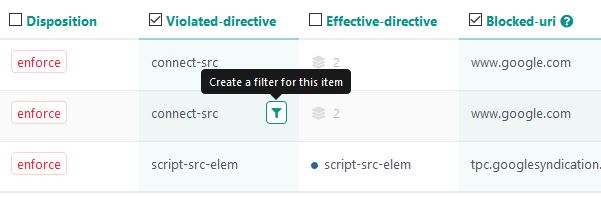
View aggregated data: If an aggregated report contains multiple values in a specific field, we display it as an icon followed by a number  . Click the icon to see the values. We then set a filter, so those are the exact values you see.
Inspect: If you want to view the individual reports in an aggregated dataset, you can click the "Inspect" button to the right of an aggregated report. This opens a window containing all the individual reports. Values that are unique to individual reports are summarized at the top of the window.
Reports triggered by many individual visitors are highlighted with a red number in the report list.
The threshold is based on the number of individual clients sharing the same violation relative to the total number of individual clients.
Reports that exceed the set threshold are the ones that you need to focus on. All website reports are automatically sorted based on this threshold, so you can immediately see what's important.
How can I stop receiving reports about issues I can't fix?
To ignore or block reports about issues you can't fix, you can set ignore and block rules in your account. Find out more by reading our blog about setting up ignore and block rules.
Can I hide issues that have been resolved?
Yes, you can. Read our blog about setting up ignore and block rules.
What happens with blocked reports?
When we receive a report that you would like to block, we don't process it in your account, and we drop it when we receive it. Blocked reports don't count towards your quota, but we use a fair use policy for blocking reports to keep our service running smoothly.
You can set up ignore and block rules in your account. To find out more, read our blog on the topic.
What happens with ignored reports?
Ignored reports are processed like regular reports – the only difference is that ignored reports are automatically hidden from your standard report view. You can view hidden reports by flipping the "Show hidden" switch in the report view.
What is the Fair Use Policy for blocked reports?
Blocked reports don't count towards your monthly quota, but we apply a fair use policy for blocking reports to ensure that our service runs smoothly. Blocked reports have to be processed by our system to check whether they have to be blocked. The current fair use policy is 20% of your quota. So if you have a subscription with 500,000 reports, you can block 100,000 reports every month. The fair use policy may change unannounced in the future. When you exceed the fair use policy limit, newly blocked reports may count towards your monthly quota. Unactionable violations, like the “abandoned” network error, are excluded from the fair use policy.
How can I hide report types that I don't use?
You can easily hide report types you don't use. Go to your settings and click the “Hide report types” option.
Why are CSP reports draining my quota quickly?
CSP reporting can generate a high volume of reports, especially on busy websites. An incomplete CSP configuration, such as missing allowed sources, inline styles, or inline scripts, can trigger excessive reports and exhaust your quota quickly. Unlike some other report types, CSP does not support fractional sampling, meaning every violation is reported.
We recommend following our step-by-step CSP guide before going live, so you can identify and resolve issues before reports start flowing into your account.
How can I fix a Content Security Policy violation?
You have two options: you can either fix the violation or add the source to the allowlist. Read our blog about setting up a solid and secure Content Security Policy. It contains some tips and tricks on how to fix CSP violations.
Some violations cannot be fixed, and for those you can set ignore and block rules.
What are those "abandoned" reports in my NEL reports (Network Error)
These network errors occur when someone visiting your site aborts fetching a resource before the action is complete. For example, this can happen when a user is navigating to another page on your site before the site is fully loaded or when an ajax call is aborted. Unfortunately, there is not much you can do to fix abandoned reports. However, you can block or ignore them when you don't want to see them in your account.

Notifications
How can I enable or disable certain notifications?
You can define which notifications you receive from each notification channel in your account settings. The email channel also lets you set a notification frequency to bundle alerts into a digest.
Can I get an instant notification on a site error?
Yes, you can be notified immediately about site errors through our Telegram bot or a custom webhook. All alerts are triggered by real issues experienced by your visitors.
Why did I not receive a notification for a DMARC failure?
Notifications are triggered by patterns that suggest actual misconfiguration, not individual failures. A single DMARC failure will not generate an alert, as this is expected behavior often caused by email forwarding or isolated reporting issues. When multiple sources consistently report failures, that is when an alert is created.
You can adjust your notification preferences in your account settings. Read more in our notifications blog.
DMARC
Why do I occasionally see failing MTA-STS reports when everything is set up correctly?
MTA-STS policies are cached by receiving mail servers, so it is normal to occasionally see a small number of reports showing a failure even when your setup is correct. If most reports pass validation and only a few mention "no policy found", this is usually caused by a temporary timeout or brief connectivity issue, not a configuration problem. If the majority of reports start failing, that could point to a DNS issue. You can validate your MTA-STS setup using our MTA-STS tool.
We do not offer an SPF flattening service, and we generally recommend against using one. SPF flattening replaces DNS lookups with hardcoded IP addresses, which breaks whenever a sending service changes its infrastructure. A better long-term solution is to reduce the number of DNS lookups in your SPF record, for example by using SPF macros. Read more in our blog about SPF and the 10-lookup limit. If you do need a flattening service, spf.guru is a free and reliable option.
What are DMARC aggregate reports?
DMARC (Domain-based Message Authentication, Reporting, and Conformance) aggregate reports contain information about the authentication status of emails sent on behalf of a domain. With these reports, you can see which messages authenticate against DKIM and SPF standards. You can also see which emails do not authenticate.
An aggregated report does not contain information about the email itself but about the source that sent the message: the domain used when sending, the IP address of the sending server, the number of messages sent on a given date, the DKIM and SPF sending domain and the authentication status.
All this information is helpful for checking who might be sending an email on your behalf, whether the sender is allowed to send an email on your behalf, and whether these messages are properly authenticating against DKIM and SPF standards. You can also check who is sending malicious emails on your behalf.
Ultimately, you can ensure that the malicious emails do not reach the recipient's inbox. You can do this by enforcing a DMARC rejection policy.
What are DMARC failure (forensic) reports?
A DMARC failure report contains the original email and email headers for an email that has failed delivery because it did not pass the DMARC validation. These reports are useful for analyzing why an email failed DMARC validation. When we receive a report, we strip the message body and clean the headers of all privacy-sensitive information so our servers do not process any personal data.
It is possible to save the unfiltered headers by uploading your PGP public key. The email headers are then encrypted with your PGP public key. Read more about privacy and DMARC failure reports in our blog.
SPF and DKIM can associate pieces of an email with a domain. DMARC tries to match the results of SPF and DKIM with the content of the email and specifically with the domain found in the email headers like the "From:" header. There is an alignment if the domain in the email headers matches the SPF and DKIM domain. If there is an alignment, the email passes DMARC validation.
SPF / DKIM check fails despite auth results passing. Why?
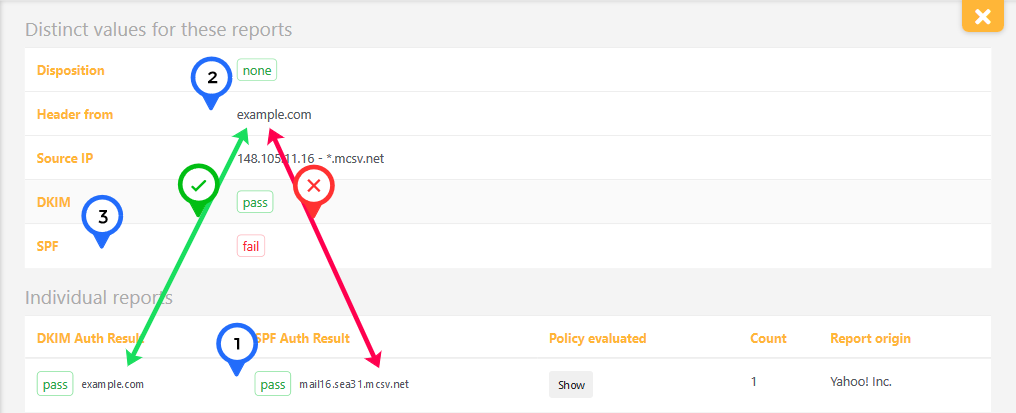
Have a look at the example below. The SPF auth results for hostname mail16.sea31.mcsv.net pass (1), but the hostname does not match the "Header from"-value example.com (2). This causes the DMARC SPF check to fail (3). Please keep in mind that for DMARC to fail, BOTH SPF and DKIM must generate anything other than pass. So in the example below, the message still passes the DMARC validation. SPF can fail when messages are forwarded or are sent from a third-party service. Avoid DMARC failures by adding a DKIM signature to every message sent on your domain's behalf.
How long does it take for the reports to appear in my account?
When you publish your new DMARC policy in your DNS, it can take up to 72 hours for email providers to load it due to DNS caching. So, you should see results in your URIports account within 72 hours after updating your DNS records.
Besides this, it is good to know that most email providers send daily reports.
Why am I missing DMARC Failure (Forensic) reports?
To receive DMARC failure reports, you must have a DMARC record published in your domain's DNS with a valid ruf address pointing to URIports. Check out our Getting Started page for setup instructions.
Keep in mind that only a small fraction of mail servers that support DMARC actually send failure reports, primarily due to privacy concerns. Unlike aggregate reports, failure reports are not generated on a regular schedule. In normal circumstances where DMARC is correctly configured, receiving few or no failure reports is generally a good sign. If your domain is targeted by a spoofing attack, you will start seeing them.
What does DMARC compliant mean?
Simply put, DMARC compliance means that the emails you or your organization send all pass DMARC validation. The goal is to achieve the highest possible DMARC compliance so that no legitimate email is blocked.
Our latest blogs
Technical deep-dives, original research, and practical guides on email authentication, web security standards, and the trends shaping both.
DMARC Report Compliance with RFC 9990
URIports now validates DMARC aggregate reports against RFC 9990, the new standard for DMARC reporting. See which organizations send compliant reports and which still need to…

Beyond script-src: how CSP Trusted Types locks down DOM XSS
Trusted Types reached cross-browser support in early 2026 with Firefox completing the picture. Here is what it is, why it matters, and how to implement it step by step.
From p=none to p=reject: A DMARC Enforcement Guide with URIports
Email authentication only delivers real protection once enforcement is in place. Many organizations publish DMARC with p=none and assume they are secure. They are…